Radio Command and Control (C2) API
RadioAPI Overview
The RadioAPI provides a means for the Colosseum to control aspects of users’ containers in support of batch mode operations. Users can write script files that are called by the SRN controllers at various points during the batch execution. This document provides more information for users on the format of those scripts.
The RadioAPI provides the following scenario control functions:
Radio State Control: management and notification of user container state throughout the reservation and scenario execution process
Colosseum Configuration: provide static configuration parameters to user containers, such as collaboration network parameters and channel emulator operating frequency
Mandated Outcomes: provide scenario-specific performance objective updates during scenario execution
Environment Updates: provide scenario-specific configuration parameter updates during scenario execution, such as available bandwidth, incumbent protection directives, and scenario stage resets
Example RadioAPI scripts with default behavior can be found here.
RadioAPI Update Log
Date |
Update Notes |
|---|---|
4/17/17 |
Initial release defining radio control scripts |
6/6/17 |
Added colosseum_config.ini configuration file |
10/18/17 |
Added rf_bandwidth parameter to the colosseum_config.ini configuration file |
3/7/18 |
Added Mandated Outcomes and Environment Updates scripts and configuration files |
5/24/18 |
Updated Environment Update content to include collaboration network degradation |
9/27/18 |
Updated Environment Update table to include scenario_rf_bandwidth and scenario_center_freqeuncy parameters to allow dynamic scenario frequency updates |
10/2/18 |
Clarified scenario_rf_bandwidth and scenario_center_frequency to indicate that these values supersede colosseum_config.ini parameters while the environment.json file with those fields are present |
10/17/18 |
Documentation clarification in the Radio State Control Overview and status.sh sections to indicate that returning “READY” from status.sh calls made at the 10-minute mark is recommended to avoid failed reservations |
Radio State Control Overview
Radio state control is a mechanism used by the Colosseum to query-and-execute match actions.
Radio State Diagram
While the defined commands can be called at any time and should be handled appropriately. All scripts must return within 5 seconds. Typically commands will be called in the following states:
start.sh - called while radio is in the READY state to start the match, but can be called when the radio is in the OFF or BOOTING state if it is taking too long to get to the READY state
stop.sh - called while radio is in the ACTIVE state to end the match, but can be called when the radio is in the OFF, BOOTING, or ACTIVE state to abort the match
statistics.sh - (currently not implemented) called while radio is in the ACTIVE state to check on radio performance and gain visualization and scoring information.
status.sh - called at any time to check on radio state, *but is always called at the 10 minute mark of a batch reservation at which time the radio should return the READY state to avoid a failed reservation*.
See the diagram below for the radio life cycle.
The following timing limits will be enforced:
The radio has 10 minutes to get to READY once the batch job is running. Even if it is not READY at 10 minutes, start.sh will be called anyway. Note: this 10 minutes includes container instantiation time; so if your container takes 3 minutes to start up, then you only have 7 minutes left for any user-side startup-and-configure routines.
Note
At the 10 minute mark of the reservation, the radio must return the READY state when status.sh is called in order to proceed to the ACTIVE stage of the reservation
If the container is loaded and allocated within 5 minutes of the start of the reservation, its state will automatically be set to READY
It is recommended that status.sh be configured to return READY as soon as your radio application is prepared to enter the ACTIVE state
The radio has 2 minutes to log collect once stop.sh is called. If the log collect is not FINISHED within two minutes, the container will be stopped anyway (and whatever unfinished log collect is lost forever).
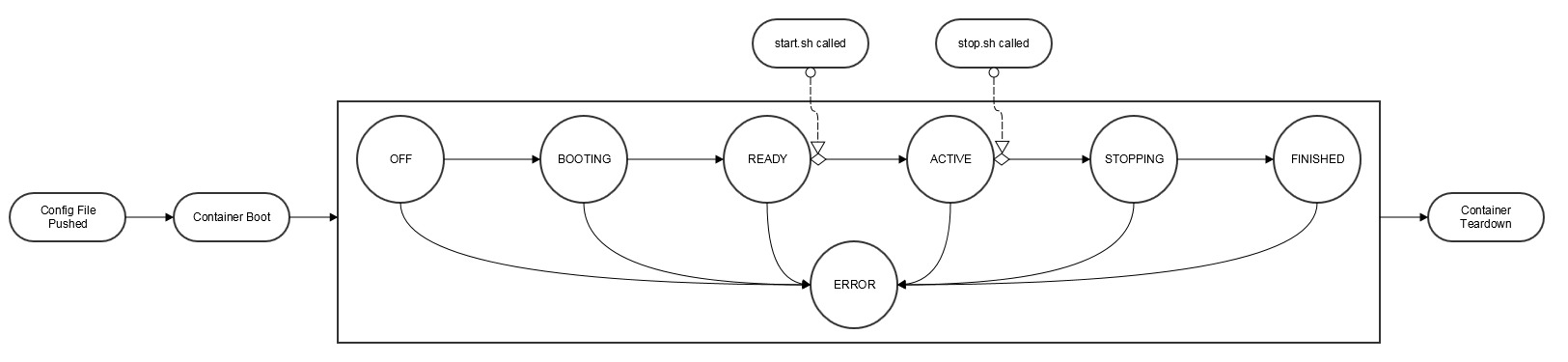
Radio State Descriptions
OFF - radio has not begun the booting process
BOOTING - radio is starting up
READY - radio has started up and is waiting for a call to start.sh
ACTIVE - radio has received start.sh call and is running normally and is free to transmit
STOPPING - radio has received call to stop.sh and is executing shutdown activities
FINISHED - radio has completed shutdown activities
ERROR - radio has encountered an error
Colosseum Configuration Overview
Colosseum configuration are configuration parameters that are required for user containers must be aware of in order to correctly integrate with Colosseum during a batch job. Information is provided both from Colosseum (colosseum_config.ini) and by the user (radio.conf).
Parameters defined in these files are provided at the beginning of a reservation and the content is not updated by RadioAPI during the reservation.
Mandated Outcomes Overview
Warning
Mandated outcome support is limited at this time
Mandated Outcomes represent a set of objectives in a scenario that CIRNs must accomplish. Each CIRN must successfully complete its given Mandated Outcomes in order for the ensemble to succeed.
Mandated Outcomes are provided to a single file in each container which may vary from node to node within a scenario. When this file is updated, a corresponding RadioAPI script is called to notify the container that the file has been updated.
Important: Mandated Outcomes is currently implemented only in batch mode executions. For testing Mandated Outcomes in interactive mode, there is a test harness that can be used within a container, which is available here: https://gitlab.com/darpa-sc2-phase2/radio-api/tree/master/test_harness
Environment Updates Overview
Environment Updates are configuration parameters which convey scenario-specific restrictions, limitations, or information that user containers must be aware of in order to achieve scenario objectives or avoid penalization. Examples include parameters such as available RF bandwidth, incumbent protection directives, changes to collaboration network conditions. The specific content of this file are defined in the API details below.
Additionally, the Environment Updates feature also provides a mechanism which is used to communicate to the user containers that there has been a fundamental change to or discontinuity in the scenario environment. This is an informational notice for users, and no specific responses or actions are required.
Environment updates are provided to a single file in each container which may vary from node to node within a scenario. When this file is updated, a corresponding RadioAPI script is called to notify the container that the file has been updated.
Radio Command and Control (C2) API
User radios must support the Radio C2 API to work in batch mode, scrimmages, and the final event.
The Radio C2 API is implemented only through scripts in the user container.
The SRN uses the API by calling the required script files in the user container.
Users must implement all scripts.
All scripts must be located in /root/radio_api/.
The C2 API defines configuration files used to convey information into the container and also defines scripts to control or provide updates into the container.
The contents of the configuration file and scripts are up to the users (i.e. the scripts can call a radio driver directly, or they can execute a python script that interfaces with the radio). Script inputs and outputs are pre-defined and discussed below.
Appendix A: Radio API Configuration File Details
A.1 colosseum_config.ini
The colosseum_config.ini file is a INI-formatted, colosseum-generated configuration file based on the specified scenario. This file is passed to the container before boot. The path and file name is /root/radio_api/colosseum_config.ini. The file contents will not change during the course of the run. An example of this file is below:
[RF]
center_frequency = 1000000000
rf_bandwidth = 20000000

[COLLABORATION]
collab_server_ip = 172.30.197.2
collab_server_port = 5556
collab_client_port = 5557
collab_peer_port = 5558
The fields in the colosseum_config.ini file are as follows:
Parameter Name |
Format |
Units |
Description |
|---|---|---|---|
center_frequency |
Integer |
Hz |
The center frequency of the scenario selected in the batch file. |
rf_bandwidth |
Integer |
Hz |
The allowed transmission bandwidth of the scenario selected in the batch file. Note: Some scenarios have dynamic bandwidths. When bandwidth changes, users will be notified via the environment.json by the Environment Updates feature. |
collab_server_ip |
IP address string |
N/A |
The IP address of the collaboration server and associated port definitions. For more information, see the Collaboration Protocol Specification. |
collab_server_port |
Integer |
N/A |
The IP address of the collaboration server and associated port definitions. For more information, see the Collaboration Protocol Specification. |
collab_client_port |
Integer |
N/A |
The IP address of the collaboration server and associated port definitions. For more information, see the Collaboration Protocol Specification. |
collab_peer_port |
Integer |
N/A |
The IP address of the collaboration server and associated port definitions. For more information, see the Collaboration Protocol Specification. |
A.2 radio.conf
radio.conf is an optional radio configuration file. Users can upload config files to their config directory on the NAS. The “ModemConfig” parameter in the batch file is used to specify the config file on a per node basis. This file will be pushed into the radio container to /root/radio_api/ and renamed radio.conf before the container is booted. The contents of the configuration are completely up to individual teams. Nothing in Colosseum will be parsing the configuration file.
Note: During scrimmages and events, only one radio.conf can be defined which will be used by every node for that team.
A.3 mandated_outcomes.json
mandated_outcomes.json is a json formatted file provided by Colosseum to every radio container in a match. This file contains a JSON list of goals, where each goal is a JSON dictionary. As the goals are in a JSON list, this file will include all goals on a single line, not in a one-goal-per-line format.
An example mandated_outcomes.json file for stage one of the first example scenario is available: example_mandated_outcomes_stage1.json
An example mandated_outcomes.json file for stage two of the first example scenario is available: example_mandated_outcomes_stage2.json
The fields of each traffic goal in the list of goals in the mandated_outcomes.json file are as follows:
Parameter Name |
Format |
Units |
Description |
|---|---|---|---|
goal_type |
string |
N/A |
This defines the type of outcome specified. |
flow_uid |
integer |
N/A |
The Flow Unique Identifier (Flow UID) is an integer than can be used to map between the individual objectives in mandated_outcomes. By policy, flow_uid will be used for both the flow_id and destination port number for all MGEN flows. |
goal_set |
string |
N/A |
This defines which set of goals the mandated outcome maps to when visualizing scenario performance. |
hold_period |
integer |
seconds |
This defines the period of time the requirements must be continuously met to satisfy the mandated outcome. |
requirements |
dictionary |
N/A |
A mapping between requirement name and the value specified for that requirement. One or more requirements will be specified for each goal type. If a particular requirement is not specified then traffic associated with the flow will not be scored against that requirement. See below for descriptions of all of the potential requirements fields. |
Parameter Name |
Format |
Units |
Description |
|---|---|---|---|
max_latency_s |
float |
seconds |
The maximum allowed latency in seconds for a packet to be counted by the scoring engine. |
min_throughput_bps |
float |
bits per second |
The minimum throughput in bits per second that must be achieved for a flow to be considered to be meeting its goal over a scoring interval. |
file_transfer_deadline_s |
float |
seconds |
The maximum per-packet time allowed for a file transfer. For example, if this field is set to 10.0, then every individual packet in this transfer must be received within 10.0 seconds from the time of delivery (of that individual packet) in order to be considered successful. |
file_size_bytes |
integer |
bytes |
The size of the file to be transferred, in bytes. |
Mapping Mandated Outcomes to Packets
As mentioned in the table above, the flow_uid field should be used to map individual mandated outcome goals to traffic generator packets. By convention, MGEN files will use the flow_uid field as both the flow_id and the destination port number for traffic within a CIRN. Destination port numbers will be unique within a single CIRN. To find the mandated outcome for a packet, users will need to read the destination port number from the packet header and reference that against the flow_uids in thier Mandated Outcome list.
Mandated Outcome Update Procedure
During execution of a scenario, the mandated_outcomes.json file of each node may be updated at times defined by that scenario.
The Colosseum will call update_outcomes.sh on each user node immediately following any update to mandated_outcomes.json. Users can integrate this script into their radio application as appropriate to indicate that the mandated_outcomes.json file must be reread. This is the only method for receiving file update notifications supported by the Colosseum.
Update Notes:
The Colosseum will push a new mandated_outcomes.json file into the container, overwriting the contents of the existing file.
mandated_outcomes.json is not guaranteed to exist at radio boot time.
mandated_outcomes.json is guaranteed to exist once Colosseum calls update_outcomes.sh on a node.
A.4 environment.json
Parameter Name |
Format |
Units |
Description |
|---|---|---|---|
collab_network_type |
string |
N/A |
One of “INTERNET”, “SATCOM”, or “HF” indicating the type of collaboration network to which the node is connected |
incumbent_protection |
JSON |
N/A |
This parameter contains the definition of a protected frequency band reserved for incumbent radio use. It contains three subfields in JSON format:
|
scenario_modeled_frequency |
integer |
Hz |
[This is currently a placeholder parameter] |
scenario_rf_bandwidth |
integer |
Hz |
While this field is present, this parameter supersedes the value specified by the rf_bandwidth parameter in the colosseum_config.ini file and is the allowable RF bandwidth in integer Hz of the allowable transmission frequency range available to the radio centered at the scenario_center_frequency parameter. |
scenario_center_frequency |
integer |
Hz |
While this field is present, this parameter supersedes the value specified by the center_frequency parameter in the colosseum_config.ini file and is the center frequency in integer Hz of the allowable transmission frequency range available to the radio. |
Environment Update Procedure
During execution of a scenario, the environment.json file of each node may be updated at times defined by that scenario.
The Colosseum will call update_environment.sh on each user node immediately following any update to environment.json. Users can integrate this script into their radio application as appropriate to indicate that the mandated_outcomes.json file must be reread. This is the only method for receiving file update notifications supported by the Colosseum.
Important: The Colosseum will push a new environment.json file into the container, overwriting the contents of the existing file.
Appendix B: RadioAPI Scripts
B.1 scenario_discontinuity.sh
*Note: The implementation and behavior of this script is not yet defined. This page will be updated when and if it becomes used.*
scenario_discontinuity.sh is called when there is a logical or physical discontinuity in scenario execution, such as a reset or instantanous movement of nodes within the scenario.
The contents of this script can be defined as needed by the users in order to integrate appropriately with their radio application. No inputs are provided, and no outputs or return codes are required.
This script must return within 5 seconds.
Inputs: none.
Outputs: none.
Example file: scenario_discontinuity.sh
B.2 start.sh
start.sh is called when the match begins (i.e. the radio is free to transmit) at approximately the 13th minute mark (time starts when the batch job begins). *It is advised that the radio software has already booted via the containers initialization process* and is waiting for start.sh to be called. Prior to the start of a match, the M-CHEM channels involved in the match will block any RF transmitted by user SRNs. When the match begins, the M-CHEM will be initialized with the appropriate scenario and user SRNs will be able to access the RF environment. start.sh will not accept any inputs. The exit code will be logged by Colosseum. If users wish to save the output of their scripts, they should log this output to the /logs/ directory.
This script must return within 5 seconds.
Inputs: none.
Outputs: exit status (0 for success), stdout and stderr may be logged.
Example file: start.sh
B.3 status.sh
status.sh is called to receive radio state information for system awareness (i.e. ready to start match). The script will not accept any inputs. Status should be returned by way of stdout and must contain one of the pre-defined states (OFF, BOOTING, READY, ACTIVE, STOPPING, FINISHED, ERROR) with an optional detailed message. The exit code will be logged by Colosseum. If users wish to save the output of their scripts, they should log this output to the /logs/ directory.
Users must use a JSON dictionary to stdout, with two entries: ‘STATUS’, which is one of the Radio States defined above and an ‘INFO’ entry. An example JSON output to standard is below:
{ "STATUS": "READY", "INFO": "Everything is Awesome" }
Note
At the 10 minute mark of the reservation, the radio must return the READY state when status.sh is called in order to proceed to the ACTIVE stage of the reservation.
If the container is loaded and allocated within 5 minutes of the start of the reservation, its state will automatically be set to READY
It is recommended that status.sh be configured to return READY as soon as your radio application is prepared to enter the ACTIVE state
This script must return within 5 seconds.
Inputs: none.
Outputs: exit status (0 for success), json status on stdout, stderr will not be logged.
Example file: status.sh
Note: the status json dictionary must contain a ‘STATUS’ entry listing a pre-defined state along with an ‘INFO’ entry which will be length limited (TBD)
B.4 stop.sh
stop.sh is called when the match is over and the radio has 2 minutes to prepare for container teardown (i.e. collect logs). The script will not accept any inputs. The exit code will be logged by Colosseum. If users wish to save the output of their scripts, they should log this output to the /logs/ directory.
After 2 minutes the container will begin the teardown process without further notification. Any user-side actions that do not complete within this 2 minute window is forcibly shutdown.
This script must return within 5 seconds.
Inputs: none.
Outputs: exit status (0 for success), stdout and stderr may be logged.
Example file: stop.sh
B.5 update_environment.sh
update_environment.sh is called immediately following an update to the environment.json configuration file in order to notify user radio applications that the contents have been updated and that it should be re-parsed.
The contents of this script can be defined as needed by the users in order to integrate appropriately with their radio application. No inputs are provided, and no outputs or return codes are required.
This script must return within 5 seconds.
Inputs: none.
Outputs: none.
Example file: update_environment.sh
B.6 update_outcomes.sh
update_outcomes.sh is called immediately following an update to the mandated_outcomes.json configuration file in order to notify user radio applications that the contents have been updated and that it should be re-parsed.
The contents of this script can be defined as needed by the users in order to integrate appropriately with their radio application. No inputs are provided, and no outputs or return codes are required.
This script must return within 5 seconds.
Inputs: none.
Outputs: none.
Example file: update_outcomes.sh