Type of Service (TOS) Field
Type of Service (TOS) and Prioritization
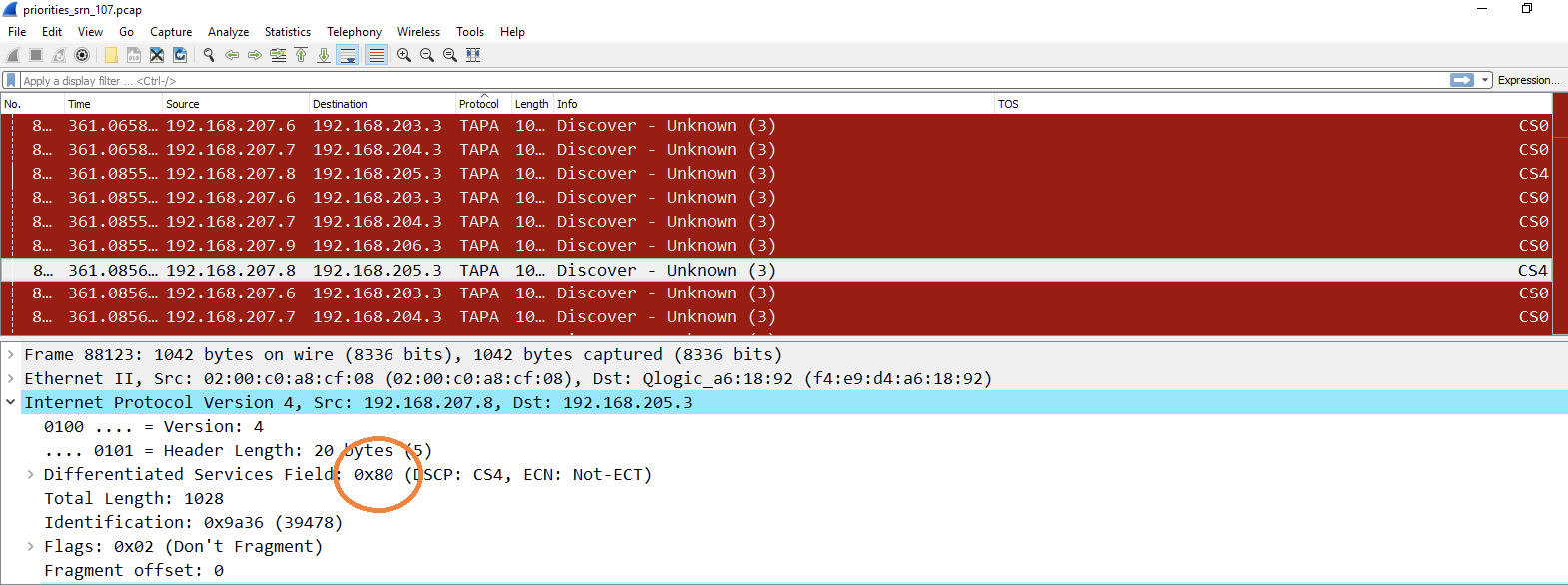
The 8-bit TOS field in IPv4 is used to convey information about traffic QoS and precedence. in IPv4. It’s intent is to convey information on a packet-by-packet basis about message precedence with higher numbers indicating higher priority. The meaning of this field has been redefined many times where the current usage defines the upper 6 bits defining the Differentiated Services Code Point (DSCP) and the remaining two bits used for Explicit Congestion Notification.
Type of Service (TOS)
Delivering different messages is worth a different number of points depending on the message class (e.g., voice, video, data) and the message priority (loosely dependent on receiver / sender identity). To inform users of the values of TOS, we are overloading the TOS field in the following manner:
The upper four bits specify message precedence
The lower four bits specify message class

These two subfields are nominally independent so that a packet that corresponds to a voice packet may be high or low priority depending on precedence and a high priority packet could be from any message class. For message precedence, in general higher numbers indicate higher priority (and scoring). For message class, a table mapping TOS values will be provided in the future and published before being introduced to Colosseum.
Map of TOS Values
Sender / Receiver Priority
Priority values by sender / receiver can vary from 0 to 15 (0x0 to 0xF in hex for the TOS subfield) and have the following weight.
For example a TOS of 0x0 indicates a priority weighting of 1; a TOS of 0x6 indicates a priority weighting of 1.6 and a TOS of 0xB indicates a priority weighting of 2.1.
Traffic Class
The following four traffic classes are defined for PE1.

Viewing TOS Fields in PCAP Files
Wireshark
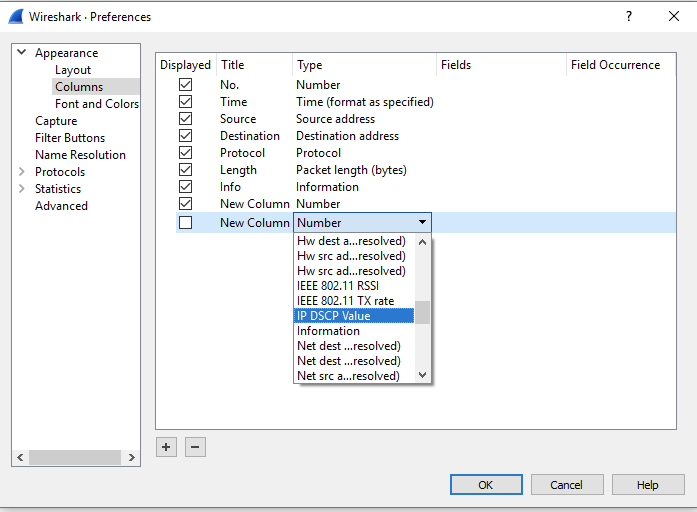
To get wireshark to display TOS data in columns, navigate to Edit->Preferences -> Appearance ->Columns. Then add a column (the + symbol), then instruct wireshark that the field type to display is IP DSCP Values.
To see the DSCP value, view the packet details (check View->Packet Details) and the Differentiated Services field will show the TOS field / byte in hex as shown below. For scrimmage 4. only two TOS field values are planned - 0x80 and 0x00.