Blueprints
Blueprints are predefined reservation information that can be used to pre-fill the details on the “Create New Reservation” page of the experiment website. This simplifies the process for users by reducing the need to manually select the number of nodes and their corresponding images each time. Only images from the common section are used in blueprints, as all blueprints are uniform for all users.
How to use Blueprints
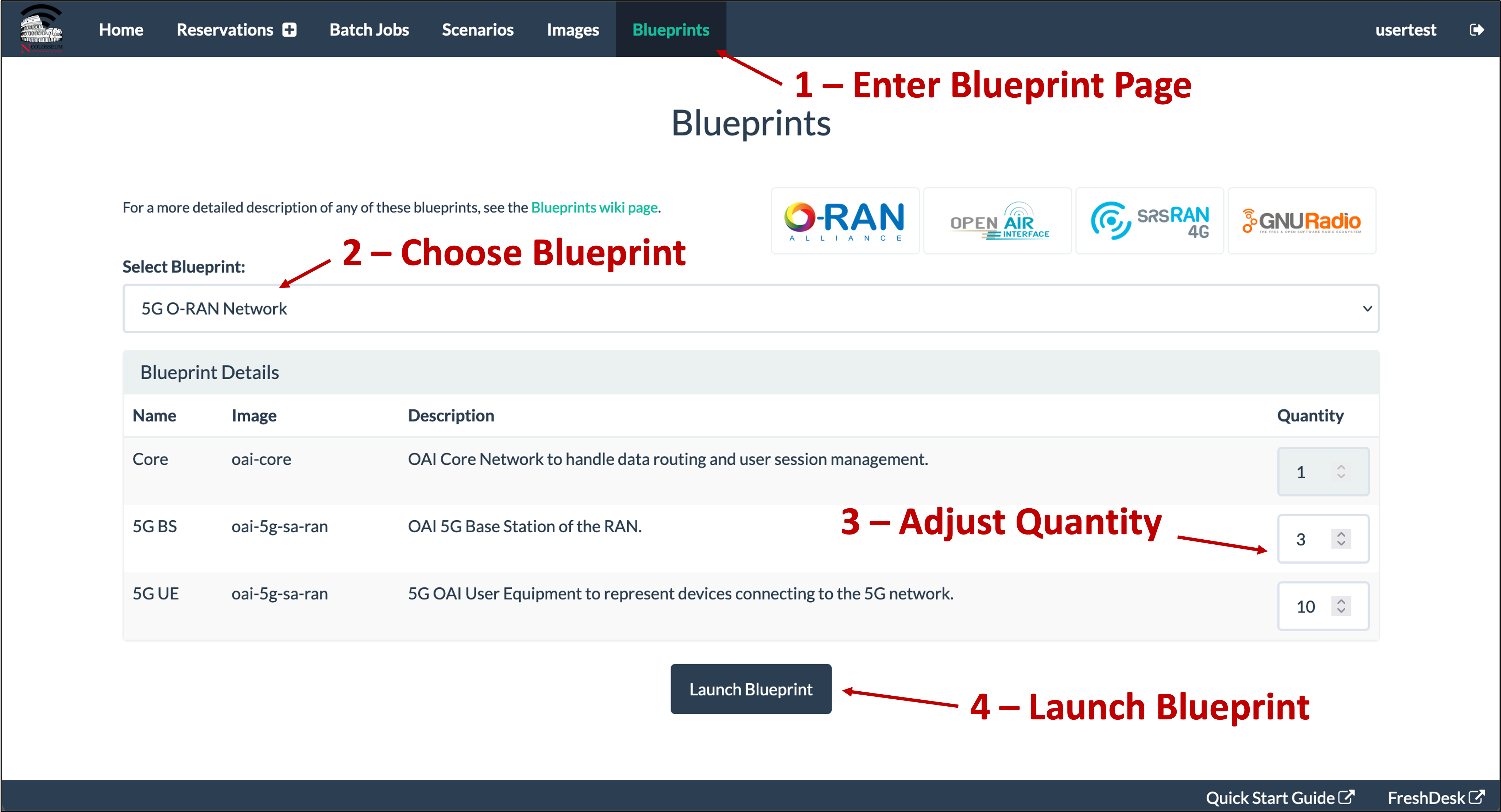
To use Blueprints, users can follow the steps below (refer to Figure below):
Access the Blueprint page by clicking the Blueprint button on the top menu (see arrow number 1).
On the new page, select the desired blueprint from the dropdown menu (see arrow number 2).
Modify the blueprint as needed (see arrow number 3). Each blueprint displays:
Name of the node.
The common image that will be selected for that node.
A short description of the node.
A node quantity that can be fixed or manually adjusted.
Press the “Launch Blueprint” button (see arrow number 4) to be redirected to the “Create New Reservation” page, with the number of SRNs and corresponding images pre-filled based on the chosen blueprint.
Note
Currently, users are not able to create new blueprints.